
Supervisible vs Float vs Runn: Which Resource Management Tool Is Right for Your Agency?
Float, Runn, and Supervisible all help agencies answer 'who's working on what.' They don't answer the same second question. Here's the honest breakdown.
Founder-led agency, 10–50 people — need capacity and margin in one view
Supervisible →Creative agency — visual scheduling is everything, per-seat pricing is fine
Float →IT or software consultancy — fixed-price projects, deep financial forecasting
Runn →Every agency has the same conversation. Someone asks "can we take this project?" and nobody has a confident answer.
The team looks busy. But busy doing what, for whom, at what margin? Spreadsheet, two gut feelings, and one Slack message later — you say yes and figure out the rest.
Float, Runn, and Supervisible all promise to fix that. They don't fix the same thing.
Here's the honest version of how they differ.
At a glance
| Supervisible | Float | Runn | |
|---|---|---|---|
| Built for | Founder-led agencies, 10–50 people | Creative teams, visual scheduling | IT, software, consulting firms |
| Pricing | $129/mo or $1,188/yr (flat) | $7–12/seat/mo | $7–11/resource/mo |
| 20-person monthly cost | $129 flat | $140–240 (grows with hires) | $140–220 (grows with hires) |
| Capacity planning | ✅ Real-time heatmap | ✅ Drag-and-drop | ✅ Timeline view |
| Project margin tracking | ✅ Live per project | ✅ Component-based (Starter+) | ✅ Real-time budget vs. actual |
| Unified profitability view | ✅ Single dashboard | ⚠️ Spread across reports | ⚠️ Requires setup |
| Long-term planning | ✅ 6–12 months | ⚠️ Limited forward visibility | ✅ Half-year / full-year views |
| Slack integration | ✅ Native — weekly digest + alerts | ✅ Native integration | ⚠️ Via Zapier only |
| Time off management | ✅ | ✅ | ✅ |
| Free trial | ✅ | ✅ 30 days | ✅ 30 days |
Float
Float has been doing this since 2011. The scheduling UI is genuinely good — drag-and-drop, color-coded projects, per-person rows, instant visual feedback on who's over capacity. If your team's primary problem is "we don't know who's assigned to what," Float solves it fast.
Float has also expanded beyond pure scheduling. The Starter plan ($7/seat/month) now includes project margin tracking, cost rates, and bill rates. The Pro plan ($12/seat/month) adds actuals tracking and estimates vs. actuals reporting. This is real financial capability — not a stub.
The difference between Float and Supervisible on the financial side isn't "has it or doesn't." It's how central that view is to the product.
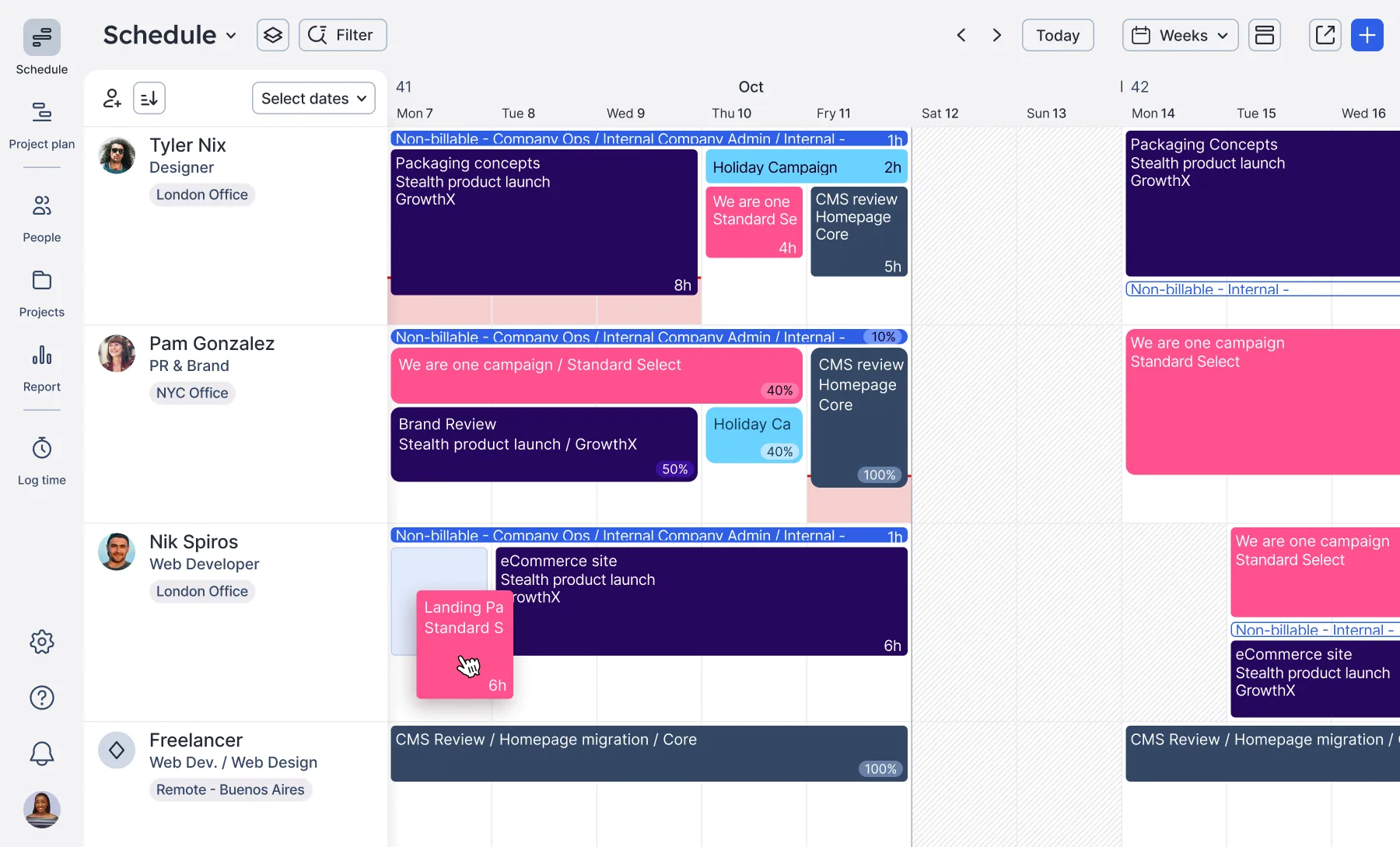 Float's schedule: every person gets a row, every project gets a color. At a glance you can see who's maxed out, who has slack, and drag tasks to rebalance. Source: Float
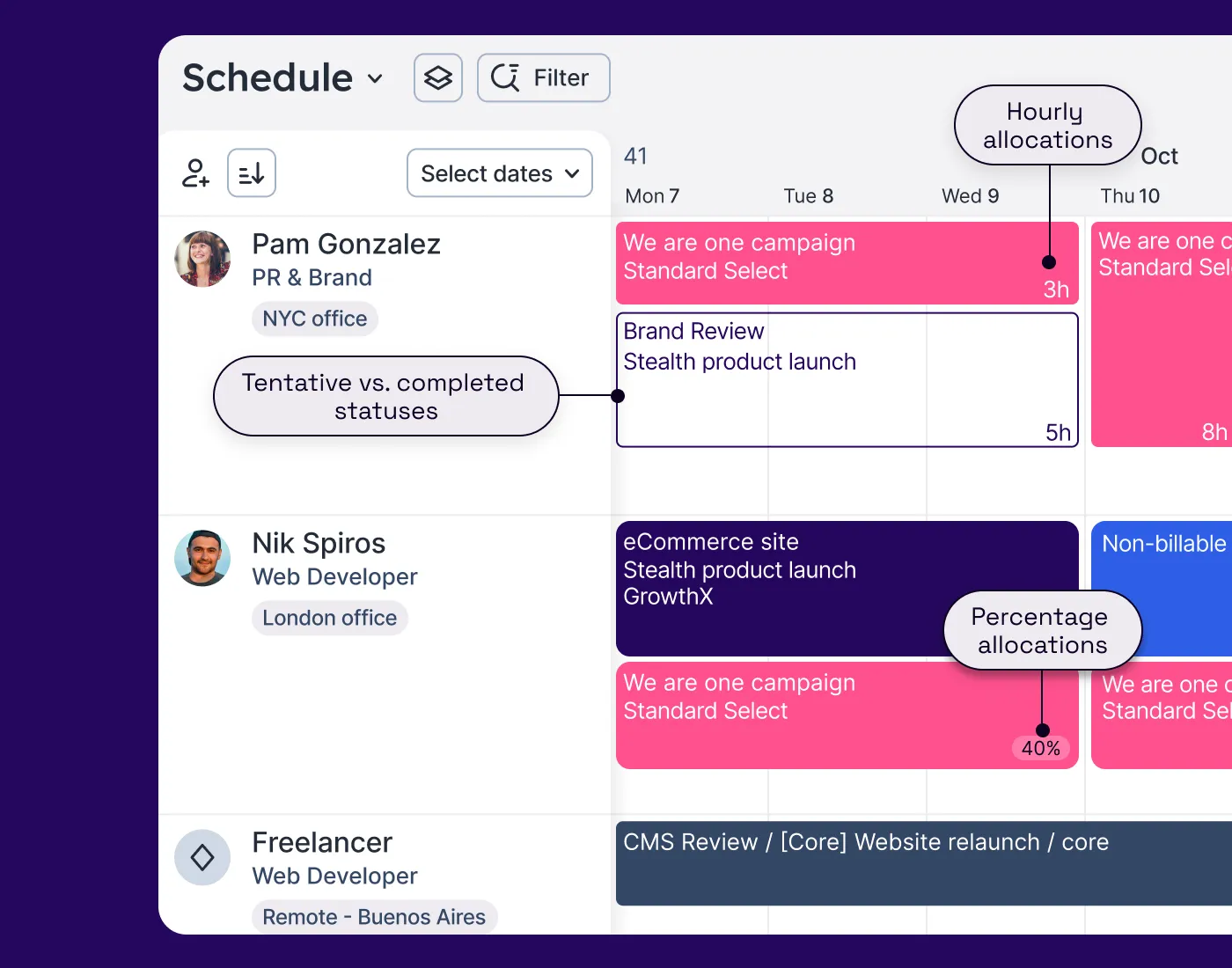 Float supports both hour-based and percentage allocations. Tentative work shows with dashed borders — useful for pitches and pre-sold projects. Source: Float
Float's scheduling view has limited long-term visibility. It's built for short-term planning — what's happening this week, next week, in the next month. For agencies trying to model pipeline 3–6 months out, it's not the right tool. One VP of Customer Success who switched to Runn described it:
"In Float you can only see your team's schedule by week and by month. The most it can offer in the 'Month' view is five weeks. There's no way to pull a hiring report like in Runn."
One Capterra reviewer captures the financial limitation well:
"A level of detail when it comes to finances and budgets vs resource is missing. The ability to link actual time spent versus project budgets is simplistic." — David, Capterra
Float has added margin tracking, but it's spread across features rather than surfaced as a single operational view. If you run a small creative agency and want a clean scheduling tool with basic financial guardrails — Float works. If you need profitability to be the primary lens, not a secondary report, you'll hit its limits.
| Float | |
|---|---|
| Short-term scheduling (days/weeks) | ✅ Best-in-class |
| Long-term planning (months/quarters) | ⚠️ Limited — short-horizon focus |
| Project margin + cost/bill rates | ✅ Starter plan |
| Actuals vs. estimates reporting | ✅ Pro plan |
| Unified profitability dashboard | ⚠️ Component-based, not consolidated |
| Slack integration | ✅ Native |
| Asana, Jira, Google Calendar | ✅ All supported |
Works well when:
- Visual drag-and-drop scheduling is the core workflow
- Your team uses Asana, Jira, or Google Calendar and needs tight integration
- Short-term scheduling is the primary problem
- You want basic margin tracking alongside scheduling, per-seat pricing is acceptable
Doesn't work as well when:
- You need to plan pipeline demand 3–6 months out
- Profitability needs to be a primary operational view, not a report you check separately
- Per-seat costs sting as the team grows
Pricing: Starter $7/seat/mo · Pro $12/seat/mo · Enterprise custom. 30-day free trial, no credit card required.
Runn
Runn is built around financial planning first, scheduling second. It combines resource allocation with budget tracking, utilization reporting, and revenue forecasting. For a software consultancy running fixed-price engagements, that's the right focus. You can see half a year of demand on one screen, model scenarios, and plan hiring against a real pipeline.
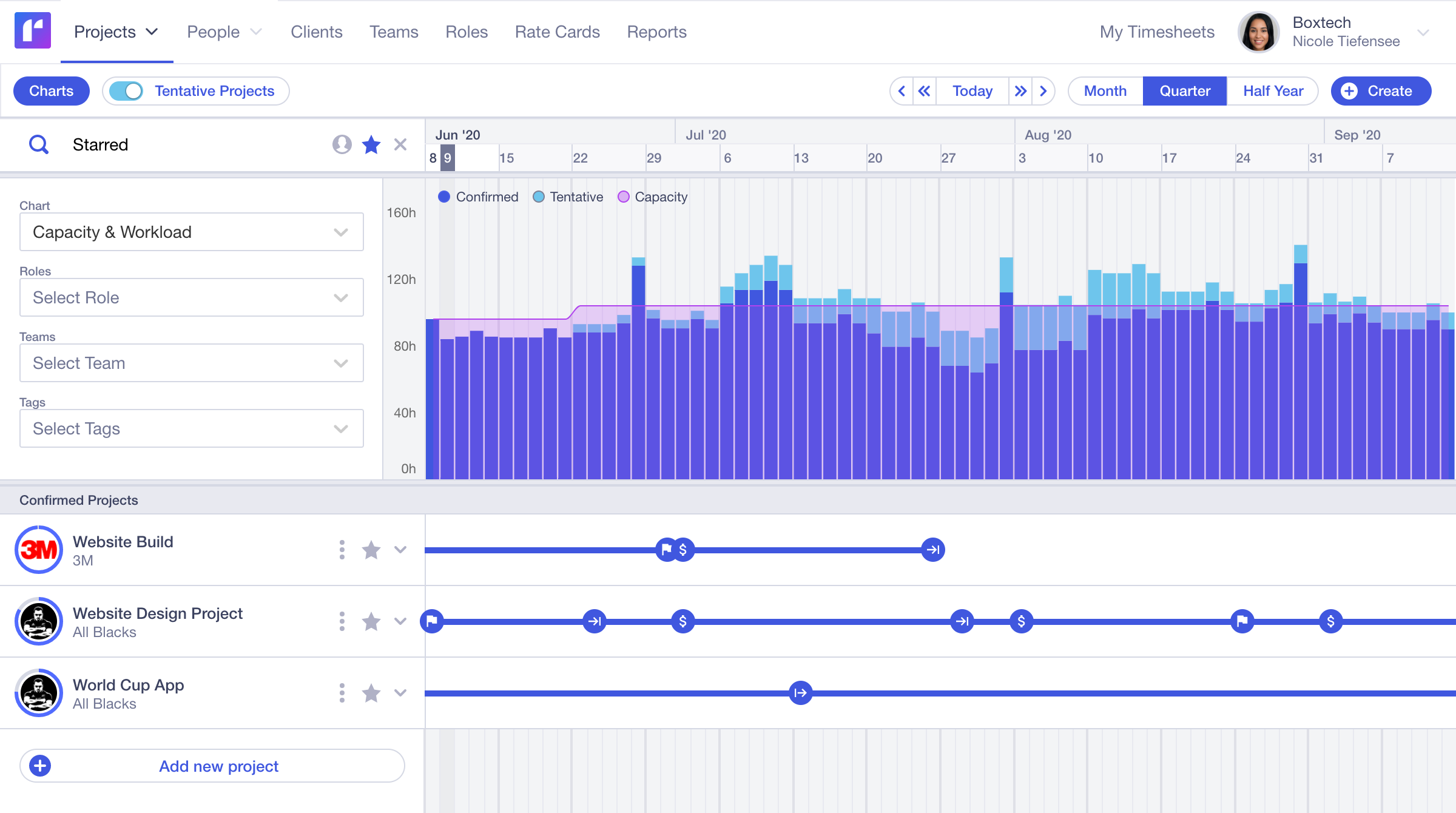 Runn's capacity chart: confirmed (dark) and tentative work stacked against team capacity. You can see 3–6 months ahead and spot where capacity runs short before it's too late. Source: Runn
This view doesn't exist in Float. Float shows you person-by-person rows for the current month. Runn shows you portfolio-level demand vs. supply — how much confirmed work is coming, how much is tentative, and where the gaps are over the next quarter.
The tradeoff
Runn requires more upfront configuration than Float. You define roles, set rate cards, map people to roles, then assign to projects. Until that's done, you don't get value from the forecasting. Most agencies need a couple of weeks to configure it properly.
The UI is also denser. Functional, but not fast to navigate daily. Teams that don't work in the financial side of Runn — developers, designers — tend to find it harder to adopt than Float.
Runn has Slack connectivity via Zapier, but no native Slack integration. That means automated workflows are possible but require setup and a Zapier subscription.
| Runn | |
|---|---|
| Short-term scheduling | ✅ Strong |
| Long-term planning (6–12 months) | ✅ Half-year and full-year views |
| Role-based placeholder planning | ✅ Core feature |
| Project budget vs. actual | ✅ Real-time |
| Revenue forecasting | ✅ By project and portfolio |
| Native Slack integration | ⚠️ Zapier only |
| Jira, Harvest, Clockify | ✅ Native integrations |
Works well when:
- You're an IT, software, or consulting firm running fixed-price or T&M projects
- Budget burn and revenue forecasting matter as much as utilization
- You have process maturity to invest in a 2–3 week setup
- Long-term pipeline planning is a real operational need
Doesn't work as well when:
- You need your whole team to live in the tool daily — adoption is harder
- Native Slack workflows are important to your operations
- You need value from week one without configuration overhead
Pricing: Lite $7/resource/mo · Standard $11/resource/mo · Advanced custom. 30-day free trial.
Supervisible
We built Supervisible at Meaningful because we kept running two things in parallel: a scheduling tool for who's on what, and a spreadsheet for whether projects were making money. The spreadsheet always lagged. By the time you updated it, the project was half done.
The problem isn't that those tools lack financial features. Float has margin tracking. Runn has budget tracking. The problem is that the financial picture isn't the primary view — it's a report you generate separately.
For a founder running a 15-person agency, that separation is expensive. You need to know, on Monday morning, whether the projects your team is busy on are profitable. Not after you run a report. As a default view.
Projects: what matters, not just who's assigned
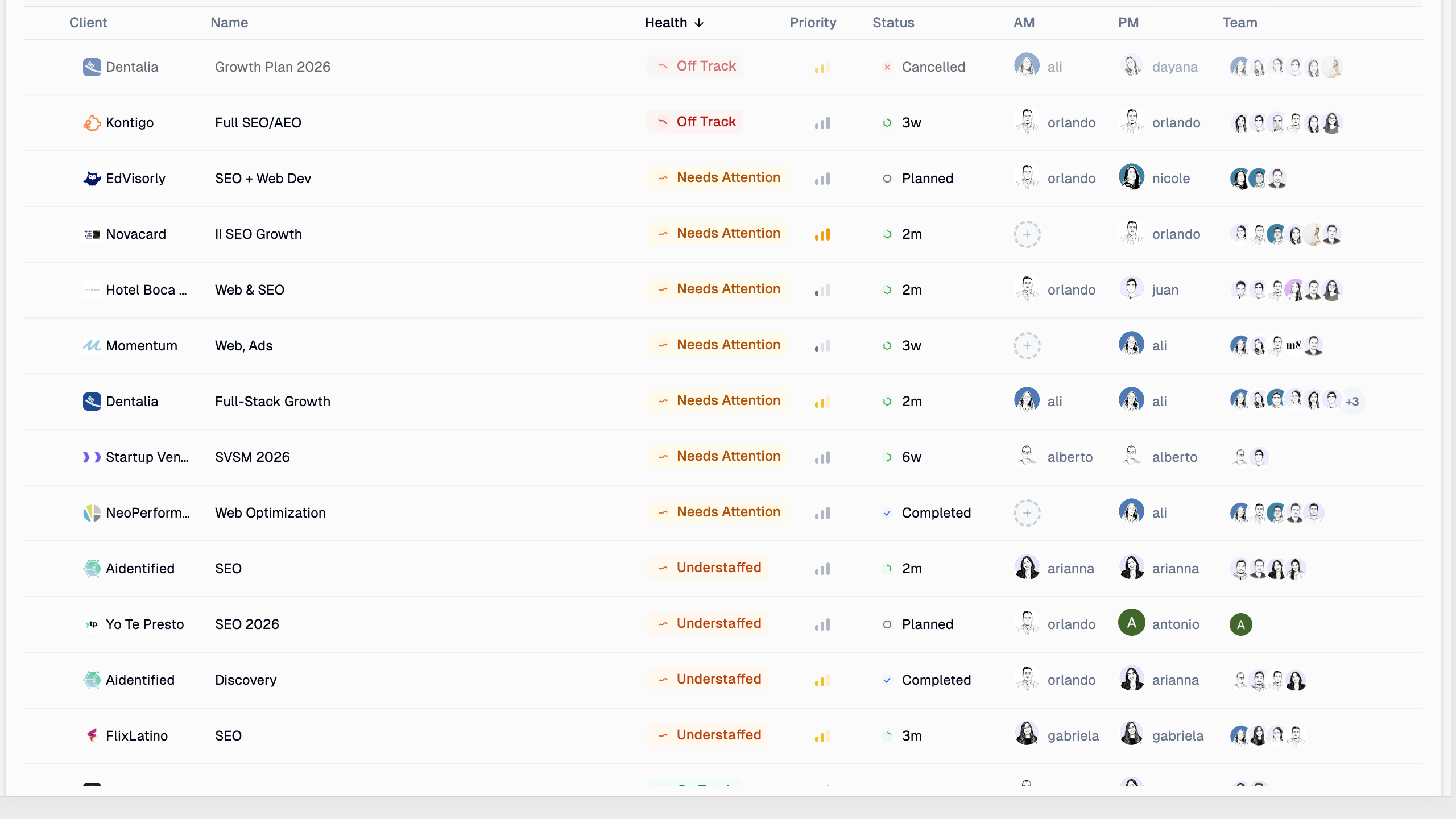 Supervisible's project list: health status, margin %, and team assignments without clicking into each project. One screen to see what's healthy, what's at risk, what has nobody on it.
Float shows you who's scheduled. Runn shows you budget burn per project. This shows you both: you can see that Project A is healthy, Project B is burning margin, and Project C has an allocation gap — all in one row.
Project detail: everything on one page
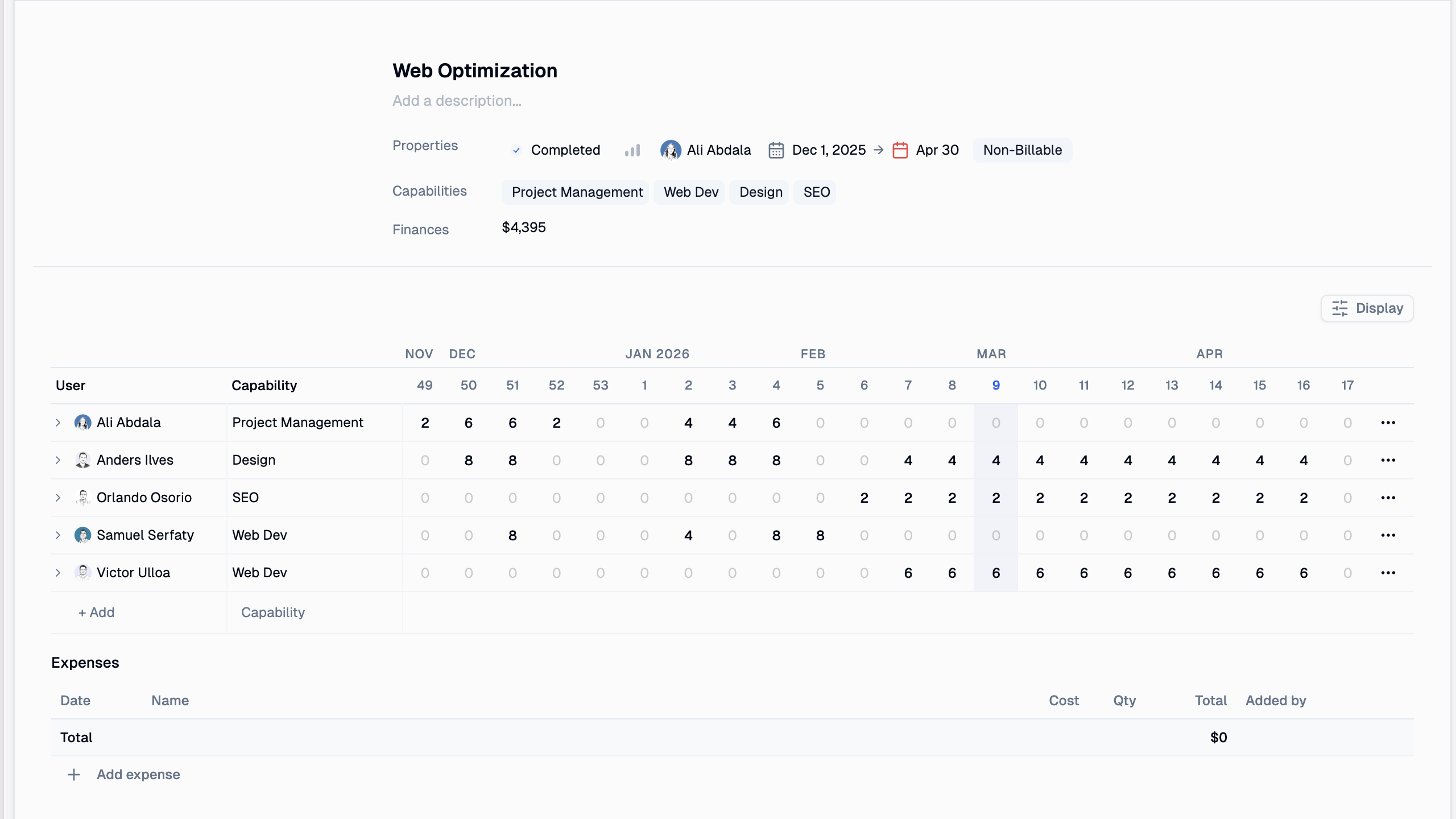 Each project: weekly allocation grid, expense tracker, billing type, and a full header with status, priority, owner, and dates — on one page.
Allocations matrix: team capacity, queryable
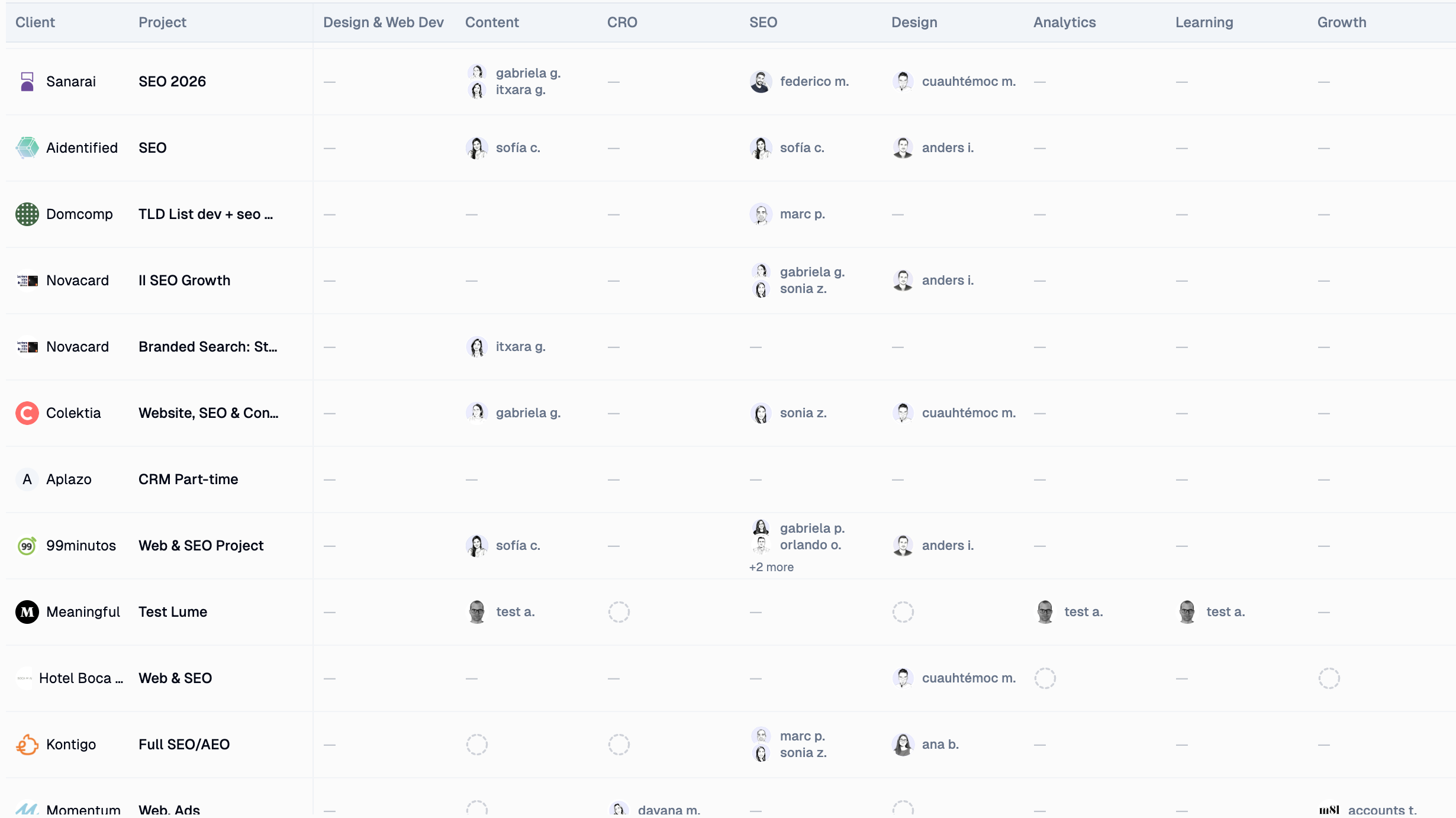 The allocations matrix: who's on what, broken down by capability — Design, SEO, Content, Dev. The bench section shows who's free. Filter by capability to find the right person for the next project.
Slack: weekly digest, not just a notification
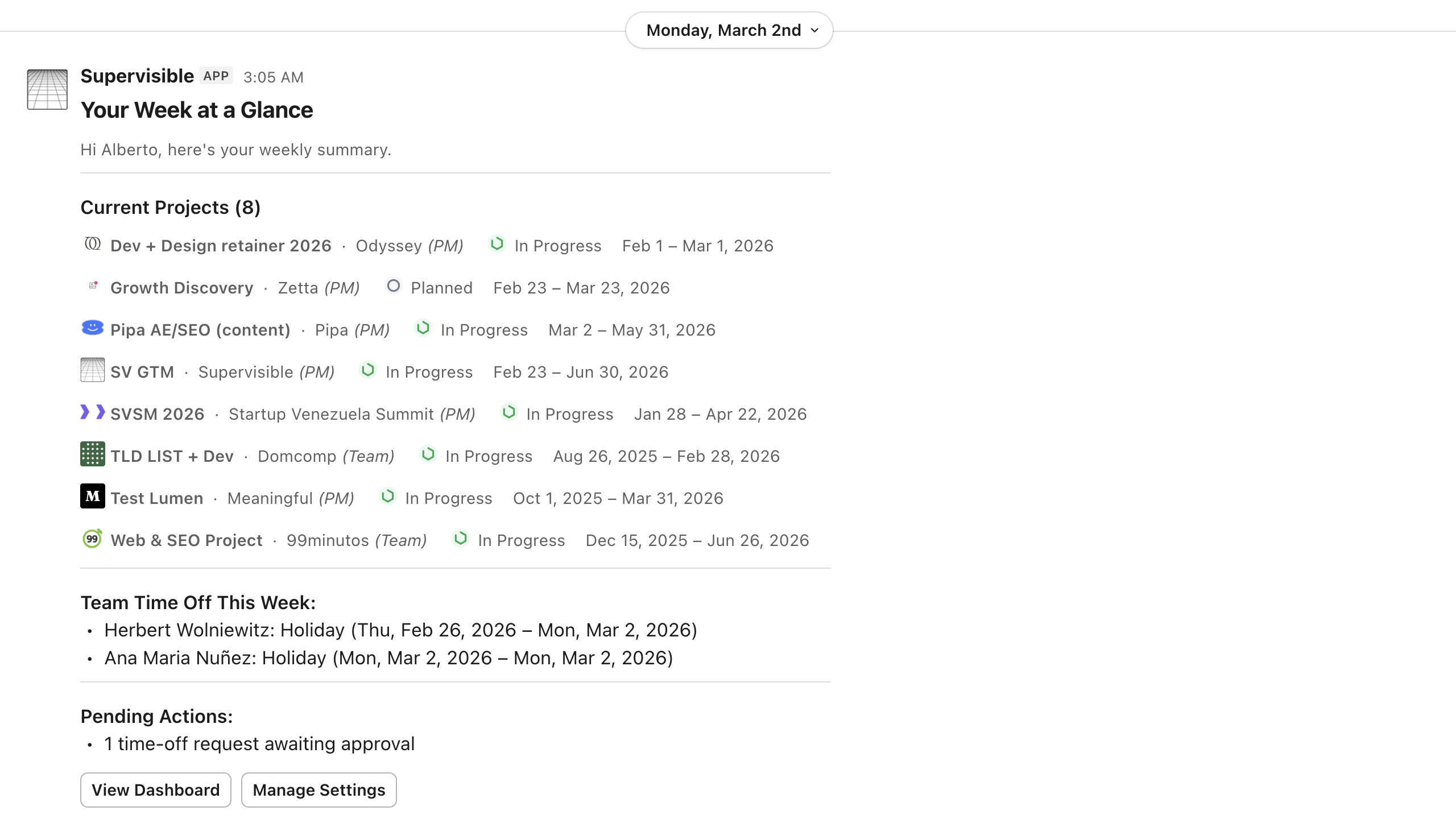 Every Monday, each team member gets their personal digest — current projects, this week's hours, time-off. Managers get capacity alerts. Float has native Slack but no digest layer. Runn has Slack via Zapier only.
| Supervisible | |
|---|---|
| Short-term scheduling | ✅ |
| Long-term planning (6–12 months) | ✅ |
| Live project margin as primary view | ✅ |
| Real-time capacity heatmap | ✅ |
| Native Slack — weekly digest + capacity alerts | ✅ |
| Time off management | ✅ |
| Flat pricing (no per-seat scaling) | ✅ |
Works well when:
- You're running a 10–50 person founder-led agency
- You want capacity and profitability as a single operational view, not separate reports
- You've outgrown spreadsheets but don't want an enterprise PSA
- Flat pricing matters — you're growing and don't want software costs to scale with headcount
Honest about what it isn't:
- Fewer third-party integrations than Float today — Slack is the primary one, more on the roadmap
- Best for 10–50 people; larger agencies (100+) typically need a PSA like Kantata
- Newer product — some features are still being built
Pricing: $129/month or $1,188/year (flat). One plan, no per-seat charges. Start free trial →
Pricing
| Supervisible | Float | Runn | |
|---|---|---|---|
| Model | Flat (whole team) | Per seat | Per resource seat |
| 10 people | $129/mo flat | $70–120/mo | $70–110/mo |
| 20 people | $129/mo flat | $140–240/mo | $140–220/mo |
| 30 people | $129/mo flat | $210–360/mo | $210–330/mo |
| Scales with hires | No | Yes | Yes |
| Annual option | $1,188/yr (~$99/mo) | ~20% discount | Not specified |
At 10 people the per-seat tools are cheaper or equivalent. At 20–30, Supervisible's flat rate becomes a meaningful advantage — especially since every new hire doesn't add to the software bill.
Detailed comparison
Scheduling & capacity
| Feature | Supervisible | Float | Runn |
|---|---|---|---|
| Visual team schedule | ✅ | ✅ | ✅ |
| Drag-and-drop allocation | ✅ | ✅ Best-in-class | ✅ |
| Over-capacity warnings | ✅ | ✅ | ✅ |
| Long-term views (6–12 months) | ✅ | ⚠️ Limited | ✅ |
| Role-based placeholder planning | ✅ | ⚠️ Limited | ✅ |
| Bench / availability view | ✅ | ✅ | ✅ |
Financials & profitability
| Feature | Supervisible | Float | Runn |
|---|---|---|---|
| Project margin — primary view | ✅ | ⚠️ Component reports | ⚠️ Requires setup |
| Cost rates + bill rates | ✅ | ✅ Starter+ | ✅ |
| Budget vs. actual | ✅ | ✅ Pro+ | ✅ |
| Revenue forecasting | ✅ | ⚠️ Limited | ✅ |
| Billable utilization % | ✅ | ✅ | ✅ |
Integrations & workflow
| Feature | Supervisible | Float | Runn |
|---|---|---|---|
| Native Slack | ✅ Weekly digest + alerts | ✅ Basic | ⚠️ Zapier only |
| Google Calendar | Roadmap | ✅ | ✅ |
| Jira | Roadmap | ✅ | ✅ Native |
| Asana | Roadmap | ✅ | Via Zapier |
| Harvest / time tracking tools | Roadmap | ✅ | ✅ Native |
| Time off management | ✅ | ✅ | ✅ |
| API | ✅ | ✅ | ✅ Standard+ |
Which one is right for you?
All three tools have scheduling. All three have some form of financial tracking now. The real question is which one is built to answer your primary question first.
Float is built to answer: Is my team scheduled and who's available this week? Runn is built to answer: Is this project coming in on budget? Supervisible is built to answer: Can we take this project, and are the ones we're running profitable?
Choose Supervisible if:
- You run a 10–50 person founder-led agency
- You want capacity and margin in a single operational view — not separate reports
- You've outgrown spreadsheets but don't want an enterprise PSA
- Flat pricing matters — you're growing and don't want costs to scale with headcount
Choose Float if:
- Visual drag-and-drop scheduling is the core workflow
- Your team lives in Asana, Jira, or Google Calendar and needs tight integration
- You want basic financial guardrails alongside scheduling
- Per-seat pricing is acceptable at your team size
Choose Runn if:
- You're an IT, software, or consulting firm doing fixed-price or T&M projects
- Deep budget forecasting and revenue modeling matter as much as utilization
- You have the process maturity to invest in proper setup
- Long-term pipeline planning (6–12 months) is a real need
Start your free trial of Supervisible →
See also: Agency Capacity Planning · Utilization Rate Benchmarks · Best Resource Guru Alternatives
Frequently asked questions
For founder-led agencies with 10-50 people who need capacity and profitability in one place, Supervisible is the better fit. Float is a strong scheduling tool that now includes basic margin tracking and bill rates, but its financial visibility is component-based — not a consolidated profitability view. Supervisible uses flat-rate pricing ($129/month), which is significantly cheaper than Float's per-seat model for teams of 15+.
Runn is best for teams that need detailed project forecasting and budget tracking alongside scheduling. It's particularly strong for IT, software, and consulting firms. Its financial modeling is more advanced than Float's. At $7-11/resource/month, it's similarly priced to Float but with stronger long-term planning views.
Float now includes project margin tracking, cost rates, and bill rates on its Starter plan ($7/seat/month). It also has actuals tracking and estimates vs. actuals reporting on the Pro plan ($12/seat/month). However, this is component-based financial tracking rather than a consolidated profitability dashboard. For agencies that need live margin per project as a primary view — not a secondary report — Supervisible or Runn are better fits.
Supervisible is $129/month (or $1,188/year) for the whole team — one flat price, no per-seat scaling. Float charges $7-12/seat/month depending on plan. Runn charges $7-11/resource/month. For a 20-person team, Float costs $140-240/month and Runn costs $140-220/month — both grow as you hire. Supervisible stays flat.
Float is the fastest to adopt — most teams are scheduling within a day. Supervisible typically takes about a week to configure roles, rates, and projects. Runn requires the most setup time because role-based planning and rate cards need to be configured before you get value from forecasting.
Know Your Capacity. Grow Your Profit.